 Slot Engine
Implementing your Game
Keep full control over your game flow.
Quick Start
The entire game flow will live inside a single hook that is passed to the game configuration.
export const game = createSlotGame({
  /* the rest of your configuration */
  hooks: {
    onHandleGameFlow(ctx) {
      // implement your game here
    },
  },
})
As a game implementation might be a couple hundred lines long, you could write your implementation in a different file.
import { GameContext } from "@slot-engine/core"
import { GameModesType, SymbolsType, UserStateType } from "./your-main-file"

type Context = GameContext<GameModesType, SymbolsType, UserStateType>

export function onHandleGameFlow(ctx: Context) {
  // ...
}
Example Implementation
Check out a complete game flow example on our GitHub.
Dos and Don'ts
✅ Do
Pass game context around
If you want to separate your game implementation into multiple functions to avoid code duplication, you can safely pass the context between functions.
export function onHandleGameFlow(ctx: Context) {
  drawBoard(ctx)
}

function drawBoard(ctx: Context) {
  const reels = ctx.services.board.getRandomReelset()
  // ...
}
❌ Don't
Destroy reference to the context object
Your simulations will not work as intended if you do this.
export function onHandleGameFlow(ctx: Context) {
  const nope = { ...ctx }
  const yesButWhy = ctx
}
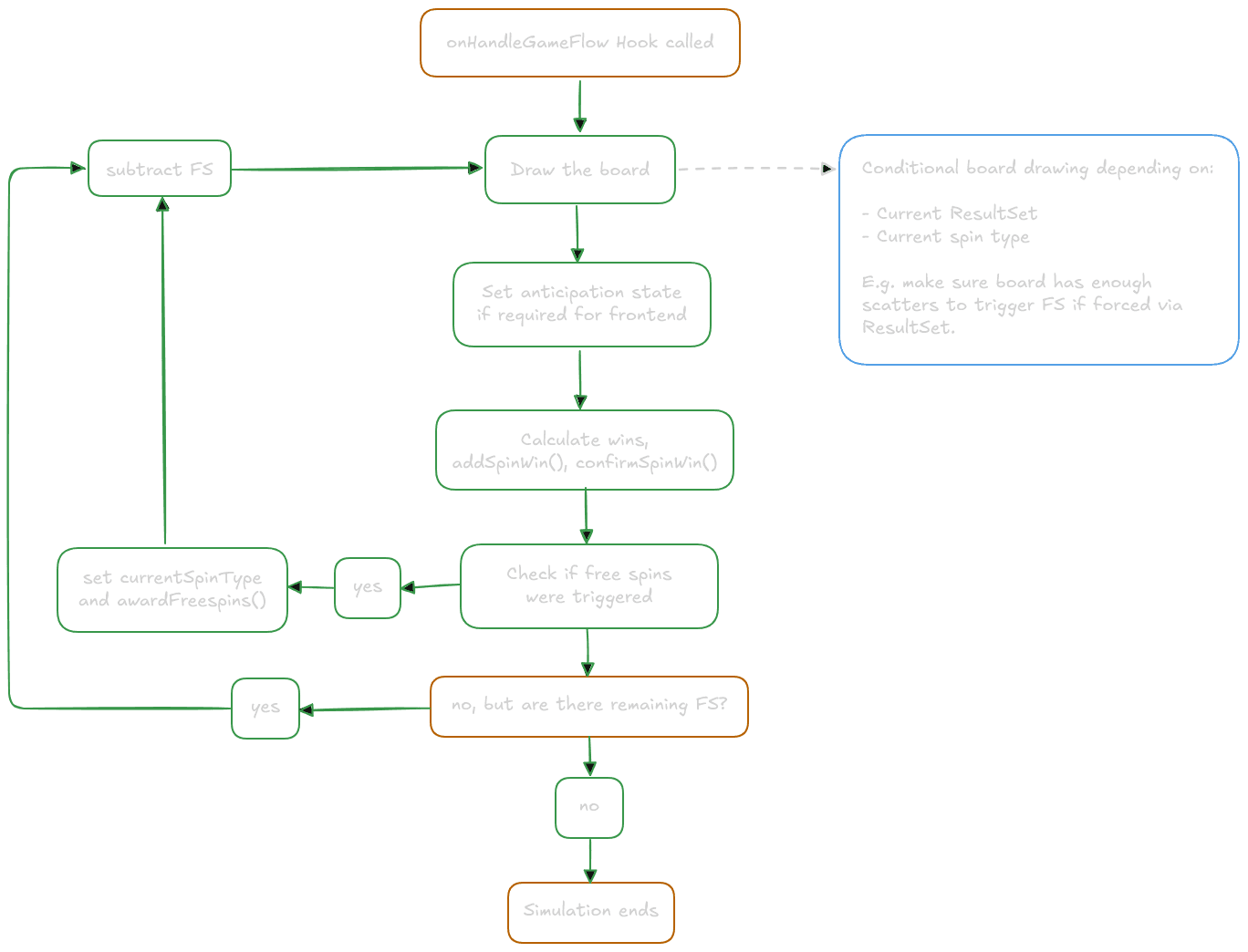
Game Flow Visualization
To help you understand slot game flows, here is a graphic showing a general game flow.
Next Steps
Learn about the context object and what role it plays when implementing your game.
Use of AI on this page: All texts were initially written by hand and many were later revised by AI for improved flow. All AI generated revisions were carefully reviewed and edited as needed.